A DJ invoice needs nine things: your details, the client’s details, a unique invoice number, the gig date and venue, an itemised breakdown of what you’re charging for, the subtotal, tax (if you’re registered), the total, and payment terms. Most free templates give you a generic services line and stop there. The difference between that and an invoice that gets paid on time is itemisation. Here’s the full breakdown, including what changes by gig type.
Two ways to use this template: copy the core table below straight into a doc or spreadsheet and fill in your details, or skip the retyping entirely: the free DJ invoice generator fills the same fields in, toggles GST/VAT, and downloads a tax-ready PDF in minutes.
The core template
Copy this structure into whatever you’re invoicing with (a doc, a spreadsheet, or a tool that fills it in for you):
| Field | What goes here |
|---|---|
| Invoice number | A unique ID (e.g. 2026-014) so a payment can be matched to the right gig |
| Your details | Name / DJ or business name, address, contact, tax registration number if applicable |
| Client details | Venue, promoter or client name and contact |
| Issue date & gig date | The date you’re billing, and the date you actually played |
| Line items | Performance, setup/teardown, travel, extras (see below), each on its own line |
| Subtotal | Sum of all line items before tax |
| Tax | GST/VAT/sales tax as its own line, only if you’re registered |
| Total | Subtotal + tax |
| Payment terms | How to pay, by when, and any deposit already received |
A filled-in DJ invoice example
Here’s a sample of what the template looks like completed, a 4-hour club gig with setup, travel and a deposit already paid:
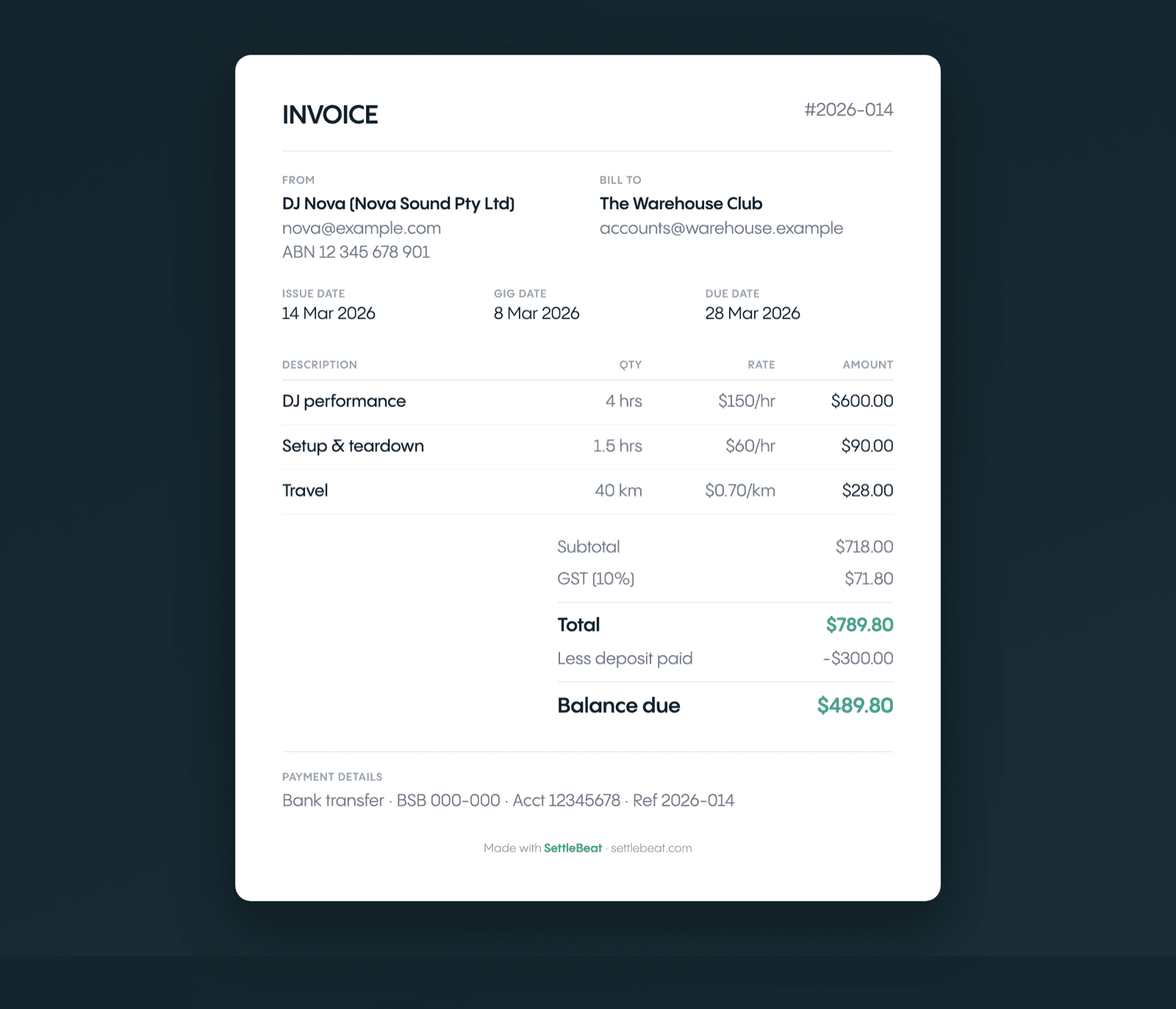
For this exact invoice with your own details on it, the free DJ invoice generator fills it in as you type and downloads it as a tax-ready PDF, no account needed. Or copy the shape and swap in your own numbers:
Invoice #2026-014 From: DJ Nova (Nova Sound Pty Ltd) · ABN 12 345 678 901 · [email protected] Billed to: The Warehouse Club · [email protected] Issue date: 14 Mar 2026 · Gig date: 8 Mar 2026 · Due: 28 Mar 2026
| Line item | Qty / hrs | Rate | Amount |
|---|---|---|---|
| DJ performance | 4 hrs | $150/hr | $600.00 |
| Setup & teardown | 1.5 hrs | $60/hr | $90.00 |
| Travel | 40 km | $0.70/km | $28.00 |
| Subtotal | $718.00 | ||
| GST (10%) | $71.80 | ||
| Total | $789.80 | ||
| Less deposit paid | −$300.00 | ||
| Balance due | $489.80 |
The tax line and ABN only appear because this DJ is GST-registered; leave both off if you’re not. (Australian DJs: see when you actually need a GST invoice and what goes on it.) Everything else is the same for any gig.
How to write a DJ invoice, step by step
- Number it: give the invoice a unique ID (e.g.
2026-014) so a bank transfer can be matched back to the gig weeks later. - Add both parties’ details: your name/business and tax number (if registered), and the venue or client you’re billing.
- State the gig: the issue date, the date you played, and the venue.
- Itemise the charges: performance, setup/teardown, travel and extras on their own lines (see below), not one lump “DJ services” figure.
- Total it up: subtotal, then tax as its own line only if you’re registered, then the total.
- Subtract any deposit: show a deposit already paid as a negative line so the balance due is unambiguous.
- Set the terms: how to pay and by when. A clear due date is also what makes chasing a late payment simple if it comes to that. Then send it the day of the gig, not a week later.
Line items: don’t bundle “DJ services” into one number
The most common mistake on free templates is a single line that just says “DJ services: $500.” That invites a client to ask “why $500?” Break it into lines they can’t easily argue with individually:
- Performance fee: hourly or flat, stated clearly (e.g. “DJ performance, 4 hrs @ $150/hr”)
- Setup & teardown: often billed separately at a lower or flat rate (e.g. “Setup/teardown, 1.5 hrs @ $60/hr”)
- Travel: a per-mile rate or a flat zone fee, plus tolls/parking if they applied
- Equipment / extras: PA rental, lighting rig, fog machine, wireless mic, MC duties, second DJ
- Deposit already paid: shown as a negative line so the balance due is obvious
What changes by gig type
The same template flexes depending on who’s booking:
| Gig type | What to add |
|---|---|
| Wedding | Ceremony + reception as separate blocks if you covered both; MC/announcements line; deposit already paid subtracted from the total |
| Club / bar night | Often a single flat performance line; add an overtime clause (“$X per 30 min past close”) if the set could run long |
| Corporate / venue | A PO number field and the venue’s accounts-payable contact (most template-farm invoices skip these, and corporate AP will bounce an invoice without them). See how to invoice a venue as a DJ |
| Private party | Same as wedding, minus the ceremony split; add a travel line if it’s out of your usual radius |
If you produce your own tracks too, the music producer invoice template covers production-specific line items (beat sales, studio time, mixing) that a live-gig invoice doesn’t.
Common mistakes on DIY DJ invoices
- One lump line instead of itemised charges: makes every dollar negotiable
- No invoice number: makes it impossible to match a bank transfer to a specific gig weeks later
- Missing PO number on corporate invoices: a near-guaranteed payment delay
- Charging tax without being registered: only add a GST/VAT/sales tax line if you’re actually registered; see our tax invoice guide
- No record of the deposit: if a deposit was already paid, show it as a deduction so the balance due is unambiguous, not a separate mystery number
Skip rebuilding the template every time
A static template is fine for gig one. By gig fifty, retyping the same fields into a doc and manually tracking which invoice got paid is the actual time sink. SettleBeat stores your rate, venue and standard line items once, then generates a formatted, itemised invoice straight from the booking: tax handled correctly, sent to the venue, and marked paid or unpaid so you always know what’s still outstanding. Play the gig; we’ll handle the invoicing →