Free DJ invoice generator
A free online DJ invoice maker: fill in your gig details, watch the invoice build live, and download a professional, tax-ready PDF in minutes, no account needed. Built for DJs and performing artists.
Your details
Bill to (venue / client)
Invoice
| Description | Qty | Unit | Amount |
|---|---|---|---|
| DJ performance | 1 | 0.00 | 0.00 |
How to make a DJ invoice with this generator
Fill each field in above and the generator builds the invoice live, then exports a tax-ready PDF. Here's what each part is:
- Your details — name or business name, address, and contact. If you're registered for GST/VAT, include your tax number.
- Who you're billing — the venue, promoter, planner or client, with their email and (if a business) their tax number.
- Invoice number & dates — a unique number (e.g. INV-001), the issue date, and a due date so it's clear when payment is expected.
- Line items — the performance fee, plus any extras: setup/teardown, travel, extra hours, lighting or equipment. One line each, with quantity and rate.
- Tax line — only if you're registered. Show the label (GST, VAT, etc.), the rate, and the tax amount. Not registered? Leave it off.
- Total & payment details — the amount owed and how to pay it (bank transfer, PayPal), plus your invoice reference.
This is a practical guide, not tax advice — thresholds and rules vary by country and change over time. Want a copy-paste template and a filled-in example instead of the tool? See the DJ invoice template guide, or read what goes on a tax invoice for a DJ gig.
The PDF you download
A finished invoice for a 4-hour club gig, with itemised performance, setup and travel lines, GST, a deposit already paid, and the balance due. This is what the generator exports when you're done:
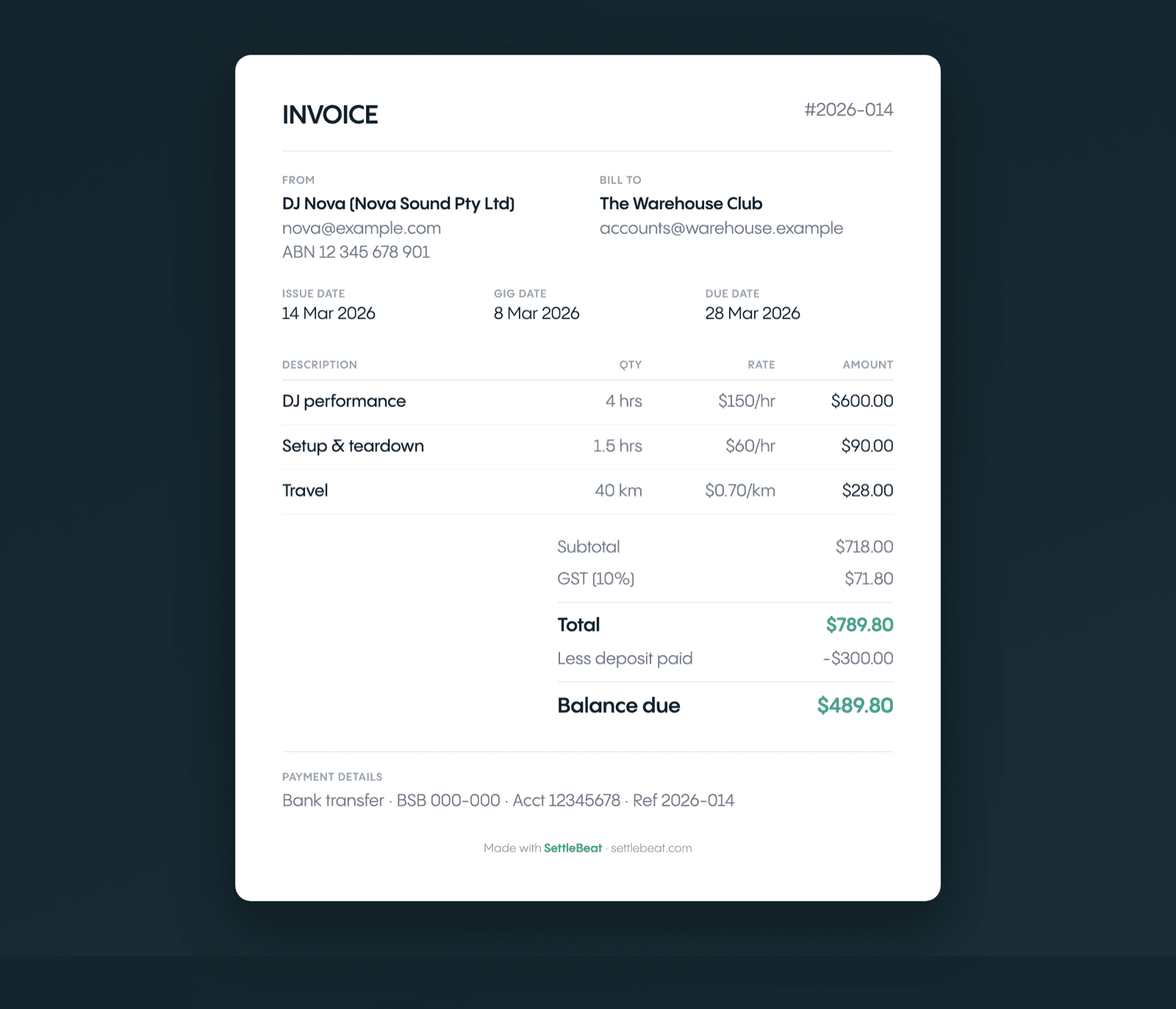
Prefer a copy-paste template or a filled-in sample to work from by hand? See the free DJ invoice template & sample — this page is the live tool that fills it in and exports the PDF for you.
Related guides for getting paid
- GST invoice for DJs in Australia — when you have to register and exactly what an ATO-compliant tax invoice needs.
- How to invoice a venue as a DJ — PO numbers, W-9s and the accounts-payable contact clubs need before they'll pay.
- How to charge a deposit for a DJ gig — how much to take up front and the terms that protect you from cancellations.
- How to chase a late gig payment — word-for-word scripts from the polite nudge to the formal demand.
DJ invoice FAQ
How do I make a DJ invoice with this generator?
Fill in your details, the venue or client, the gig date and your line items (performance fee plus any extras like setup, travel or an extra hour). The invoice previews live as you type, then you download it as a tax-ready PDF — no account needed. For a field-by-field layout and a filled-in example, see our DJ invoice template guide.
Is this DJ invoice generator free?
Yes. You fill in the fields, preview the invoice live, and download a professional PDF for free — no account required. We ask for your email so we can send the download and the occasional DJ invoicing tip.
Is there a free DJ invoice maker I can use online?
This is it — a free online DJ invoice maker that runs in your browser, no download or signup. Enter your gig details, toggle GST/VAT if you're registered, and it generates a tax-ready PDF you can send to the venue straight away.
Can I get a static layout to fill in by hand instead of using the tool?
Yes. If you'd rather copy a layout and fill it in yourself, our DJ invoice template guide has a copy-paste version and a worked example. This page is the interactive version: type your details once, it does the maths and tax, and exports a finished PDF.
Do I need to charge GST or VAT on a DJ gig?
Only if you're registered. In Australia you register for GST once turnover passes AU$75,000; in the UK it's VAT above £90,000; other countries have their own thresholds. Below the threshold you don't charge tax — just leave the tax toggle off and send a standard invoice.
Can I use this for wedding or private gigs?
Yes. It works for any gig — club nights, weddings, corporate events, private parties. Add line items for setup/teardown, travel, lighting or an extra hour, and bill the venue, planner or client directly.
Does it save my invoices?
No — this generator is a one-off tool; nothing is stored. If you gig regularly and want your venues, rates and tax settings remembered (so each invoice is one tap) plus a view of who's actually paid, that's what the SettleBeat app does.
Gig more than once a year?
A one-off generator makes you re-type everything. SettleBeat remembers your venues, rates and tax settings so each invoice is one tap — then tracks who's paid and who still owes you.
Start freeNo credit card required.